Selecting Optional Features
The Features tab is where you turn on the optional tools your event needs from contracted inventory to cancellation fees and see which features come built in with no extra setup. From your template, some optional features will already be activated, activate any additional as you see fit.
STEP 1 Open the Features Tab
From your event's Event Setup page, click the Features tab in the tab bar at the top of the screen.

The Features tab sits second in the Event Setup tab bar, right after Event.
STEP 2 Review Your Optional Features
The Optional Features section outlines the advanced tools you can enable or disable for this event. Certain options, such as Contracted Inventory, Payment Methods & Deposits, and the Sub Block Manager Dashboard, are enabled by default. All other items will display an Activate button, giving you the option to turn them on.
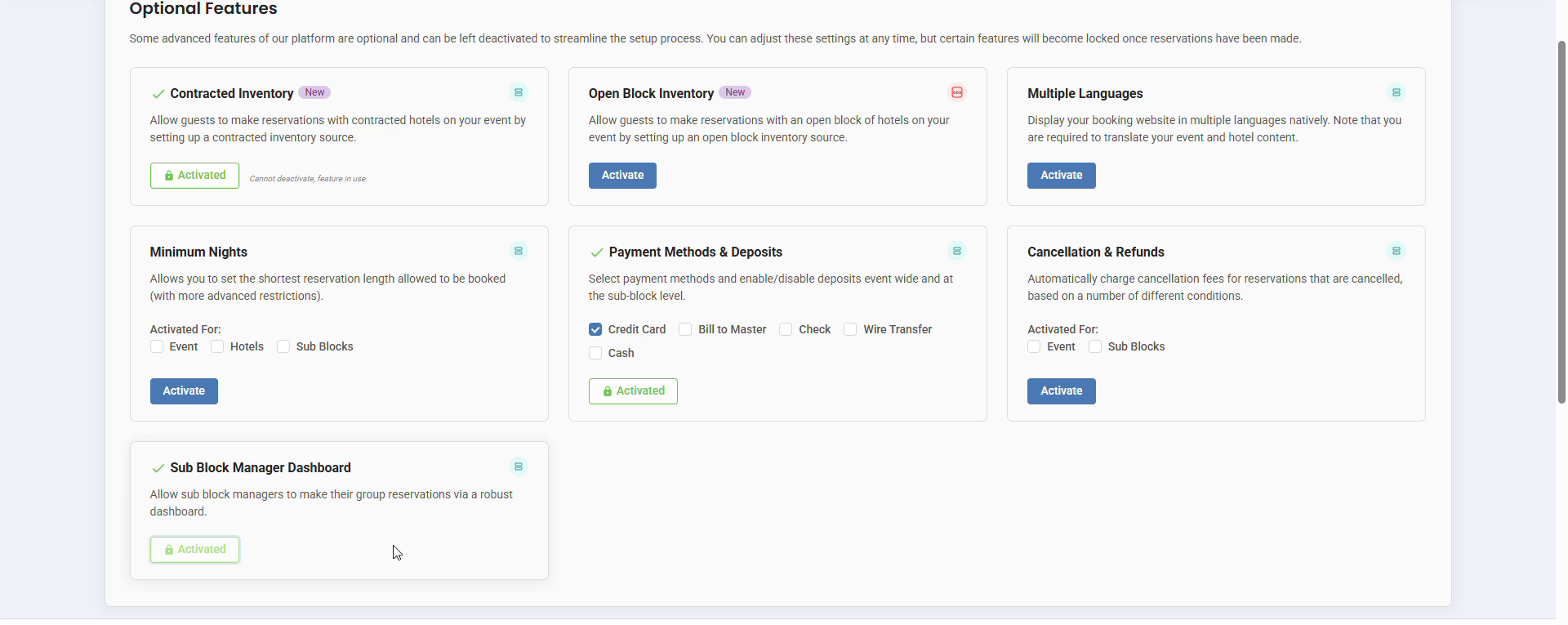
Optional Features lists every advanced tool you can turn on or off for this event.
GOOD TO KNOW
Features turn on as soon as you click Activate. There’s no confirmation step, and you don’t need to click Save. Only activate the features your event needs. Some features can’t be turned off once reservations have been made, so if you’re unsure, contact Resiada support before activating.
STEP 3 Turn On the Features You Need
Click Activate on any feature to turn it on for this event (below are the ones you will use most frequently):
- Contracted Inventory let guests reserve a room tied to a contracted inventory source.
- Payment Methods & Deposits choose which payment methods guests can use (Credit Card, Bill to Master)
- Sub Block Manager Dashboard give sub block manager/group manager a dashboard to manage their own group reservations.

STEP 4 Save or Continue
Once you've reviewed everything above:
- Click Save to save your progress without leaving the Features tab.
- Click Next to move on to the Settings tab, the next step in Event Setup.

Clicking Next moves you into the Settings tab, the next step in Event Setup.